LPE88 · Install notes
LPE88 on a phone and on a PC, side by side
Two surviving screenshots show LPE88 twice: a phone lobby sorted into slot, jackpot and table tabs, and a Windows client with a long category list. How each got installed.
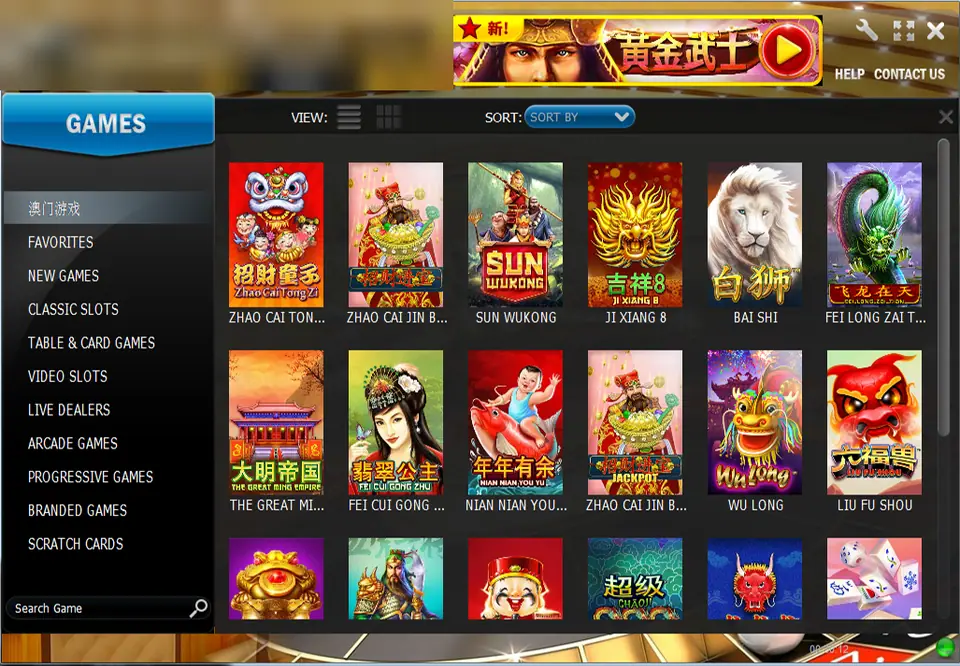
Two screenshots survive from the LPE88 page, and they show two different ways into the same games. One is the Windows client, the other a phone lobby. The old page also offered a second Android app for live dealer tables and a browser version, but no iPhone file at all: its FAQ said LPE88 had nothing for iOS. Every download link on it is dead now.
The Windows client
On a PC, LPE88 opened as a boxed window headed Lucky Palace. The left side carries a Games menu with Favorites, New Games, Classic Slots, Table & Card Games, Video Slots, Live Dealers, Arcade Games, Progressive Games, Branded Games and Scratch Cards, plus a search box. The grid on the right in our screenshot shows Chinese-themed slots like Zhao Cai Tong Zi, Ji Xiang 8, Fei Long Zai Tian and The Great Ming Empire. We've blurred the account name and balance in the corner.
Installing it meant running an EXE from outside the Microsoft Store. Expect Windows SmartScreen to warn that it can't recognise the publisher. That's a gap in the paperwork, not proof of malware, but it does mean the checking is on you: take the installer only from the agent who issued your ID, scan it with your antivirus, and walk away if anything tells you to switch the antivirus off.
The phone app
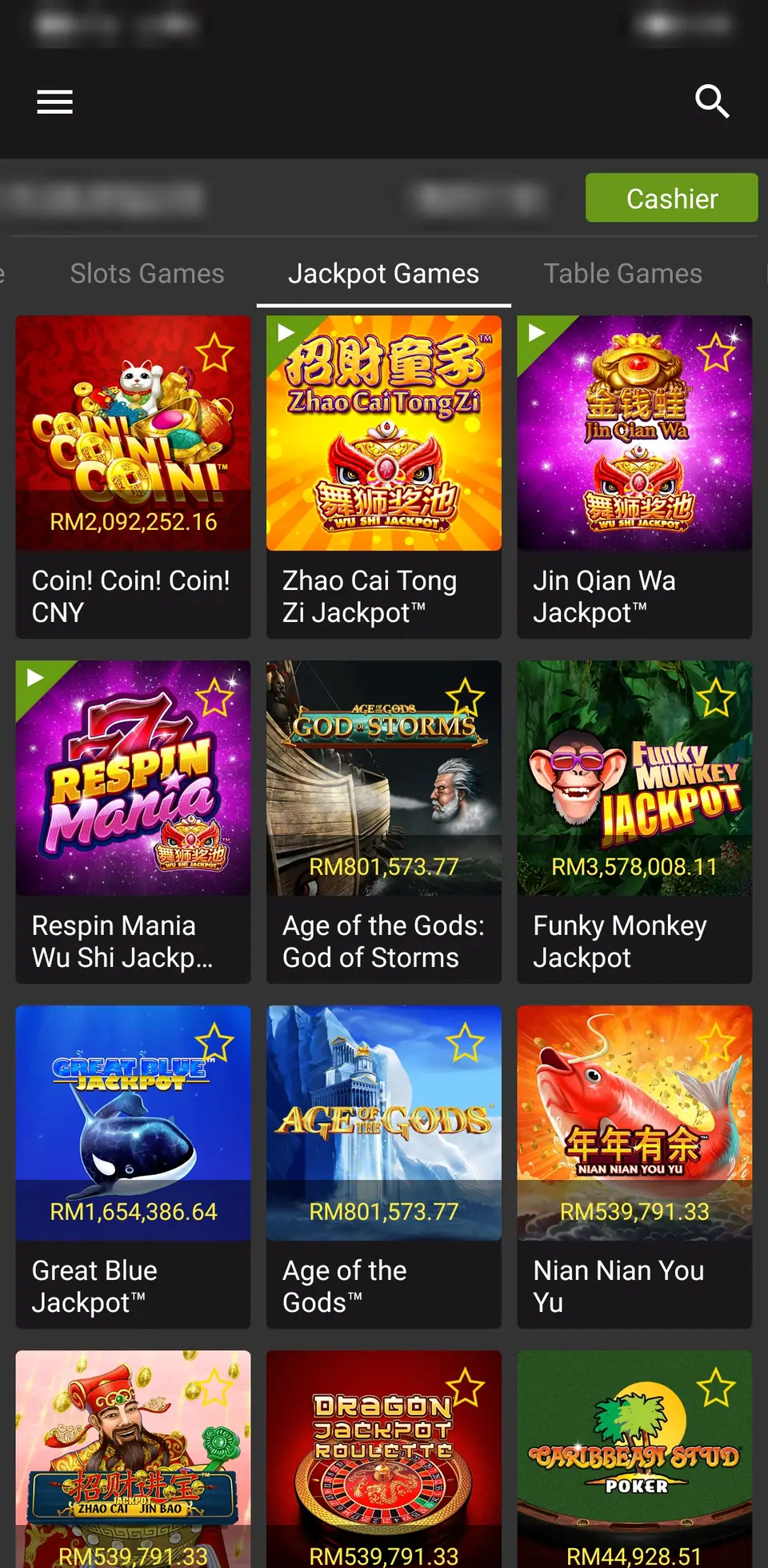
The Android version is plainer: a dark list with a Cashier button, three tabs for Slots Games, Jackpot Games and Table Games, and running jackpot figures on the tiles. This one is on the jackpot tab, with Great Blue, Age of the Gods and Funky Monkey among the games. The status bar and the account row are blurred.
To install it, the app that opens the APK needs "Install unknown apps" under Settings > Apps > Special app access. Turn it on for that one app, install, turn it off. Keep Google Play Protect on.
Two APKs mean two checks
The slots app and the live games app were separate files. Check each one the same way: ask your agent for the version and file size, compare them after the install in Settings > Apps, and uninstall anything that asks for accessibility access, SMS, contacts or device administrator rights. A lobby that shows games has no use for your text messages.
"Legal" and "risk free", it was neither
The store only lists real-money gambling from operators licensed in the country, and there is no such licence for LPE88 in Malaysia. The old page claimed LPE88 was "legal" and "completely risk free". Neither is true, which is why both lines are gone.
The LPE88 overview covers the Lucky Palace lobby, and the slots have their own pages on the LPE88 game list. NTC33's install notes cover the same slots, live and PC split, and the rest are in install notes by app. IDs come from agents; the partner can set one up.
18+ only, and online gambling is illegal in Malaysia. If you play anyway, the responsible gaming page has limits worth setting first.
Questions people ask
Was there ever an LPE88 app for iPhone?
Not on the old page. Its FAQ said LPE88 had no files for iOS and suggested the Windows client or the browser version instead.
Do I need both Android apps?
Only if you want both kinds of game. One APK held the slots and the other the live dealer tables, so each was a separate install with its own permissions.
Was LPE88 legal and risk free, as the old page said?
No. Online gambling is illegal in Malaysia, LPE88 has no Malaysian licence, and no app that holds your money outside the law is risk free.
18+ only. Real-money game, and online gambling is illegal in Malaysia. Don't play with money you need, and stop when it stops being fun. Responsible gaming.